
If your sales or service reps click a phone number in Salesforce to dial, or see a customer record pop up when a call comes in, there is a good chance that experience runs on Open CTI. Salesforce has now set a firm date: the Open CTI retirement takes effect on February 28, 2028, and Open CTI implementations stop working after that day. Sixteen months sounds comfortable, but a telephony migration touches phone numbers, routing, reports and every rep's daily routine. This guide explains what changes, who is affected, the four replacement paths and a practical migration plan.
What the Open CTI retirement changes
Open CTI is the JavaScript API that telephony vendors use to place a softphone inside Salesforce, with click-to-dial, screen pops and call controls. According to the official Salesforce knowledge article on the Open CTI retirement, published in June 2026, the timeline is:
- Since 2020: Open CTI is in maintenance mode, with no new features or enhancements.
- Since February 16, 2026: Open CTI is no longer available for newly created Agentforce Service orgs. Existing orgs keep working.
- February 28, 2028: Open CTI retires for all orgs.
The Open CTI end-of-life page in the developer documentation confirms the February 2028 date and recommends moving to Salesforce Voice, the replacement that older documents call Service Cloud Voice.
The Trailhead unit Prepare for Open CTI Retirement lists what stops working on the retirement date:
- the Open CTI JavaScript API;
- call center adapters installed from AgentExchange;
- softphone layouts and call center definition files;
- custom CTI logic such as screen pops, call routing rules and custom code.
Salesforce's argument for the change is mostly about data. With Open CTI, Omni-Channel routing does not see voice, supervisors lack a single view of phone and digital channels, and call data and transcripts stay outside core Salesforce objects, where Agentforce cannot use them.
Who is affected
Any org with a call center definition in Setup should assume it is affected until proven otherwise. In practice:
- Service teams and contact centres: agents who take inbound calls through a softphone in Salesforce, with screen pops on cases or contacts.
- Inside sales and SDR teams: reps who use click-to-dial and call logging from a telephony tool installed as a managed package.
- Admins: own the inventory of call centers, softphone layouts, users and the flows or Apex that depend on call data.
- IT and telecom teams: manage phone numbers, the telephony contract and, in some paths, an Amazon Connect instance.
- Managers and RevOps: most call reports today are built on the Task object, filled by the CTI adapter. Those reports will need to be rebuilt.

A point worth checking early: the change is not limited to large contact-centre suites. Any telephony tool installed in Salesforce as a call center adapter is concerned. Ask your vendor in writing whether its Salesforce integration uses Open CTI today, and when its Salesforce Voice connector will be available.
The four Salesforce Voice migration paths
The Trailhead unit Choose Your Migration Path describes four options. All of them bring calls into Omni-Channel, next to CRM data and AI features.
- Partner Contact Center: you keep your current telephony vendor, provided it publishes a Partner Contact Center (or Salesforce Voice) package on AgentExchange. Trailhead names Genesys, Cisco, Five9 and Talkdesk as examples. Only the integration layer changes.
- Partner Contact Center with Telephony from Amazon Connect: you already run your own Amazon Connect instance in your AWS account and bring it into Salesforce.
- Partner Contact Center with Amazon Connect: you want Amazon Connect telephony without managing AWS yourself; Salesforce provisions and manages the account.
- Agentforce Contact Center: a native, end-to-end Salesforce telephony option with no third-party vendor.
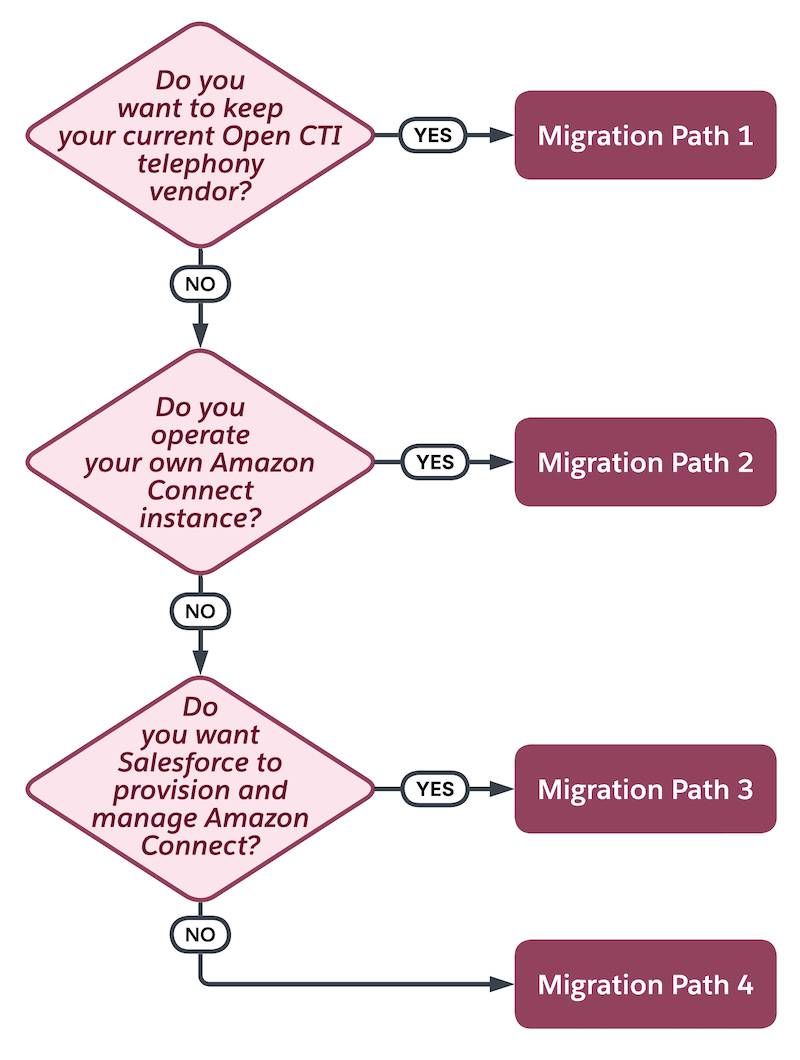
The choice comes down to three questions. Do you have a telephony vendor you want to keep? Do you already have Amazon Connect? Do you want Salesforce to manage everything? For an SMB with a single telephony provider, path 1 is often the lowest-friction option, as long as the vendor's connector exists. If it does not, that is a contract and a roadmap question to raise now, not in 2027.
For vendors and in-house developers, Salesforce publishes a guide to migrate an Open CTI integration to Salesforce Voice with Partner Telephony. It highlights the technical shifts: call records move from Task to VoiceCall, screen pops move to an Omni-Channel flow, presence status is handled by Omni-Channel, and iframe-based custom UIs are replaced by Voice extensions.
What to do now: an eight-week Open CTI migration plan
The Trailhead unit Plan Your Migration proposes an eight-week sequence once a path is chosen. Here it is, condensed:
- Week 0, inventory: list every user assigned to the Open CTI call center, every phone number in use (direct lines, queues, toll-free), every report and dashboard built on call data, and all custom logic such as screen pops and routing rules. Start number porting early: it can take several weeks.
- Week 1: install your vendor's managed package or enable Voice, depending on the path.
- Week 2: set up the contact center, Omni-Channel, service channels, queues and presence statuses.
- Week 3: build the Omni-Channel flow for screen pops and, if needed, a record-triggered flow on VoiceCall.
- Week 4: test end to end in a sandbox with a few reps, on real or simulated calls.
- Week 5, parallel run: keep Open CTI live in production while a separate group of reps uses Voice with real volume for at least a week. A rep can belong to only one contact center at a time, so use different reps.
- Week 6: cut over in production, ideally midweek and mid-month.
- Weeks 7 and 8: monitor, finalise number porting, then decommission the Open CTI package.

Two safeguards from the same unit are easy to forget. Keep Open CTI installed during the parallel run: Trailhead notes you can move reps back in 15 to 30 minutes with no data loss. And wait at least 30 days after go-live before uninstalling, after checking that no flow, Apex class or report still references the package. Our article on Salesforce Flow error handling is useful when you rebuild routing and screen-pop logic as flows.
Before and after, in short:
- Before: a softphone in an iframe, call logs as Task records, routing outside Omni-Channel, transcripts in the vendor's tool.
- After: calls in the Omni-Channel widget next to digital channels, VoiceCall records with recordings and duration, flows instead of adapter code, and call data Agentforce can use.
How to fit this into your 2027 roadmap
Eight weeks is the technical sequence, not the full project. Add time for the vendor decision, contract changes, budget approval and training, and the project easily spans several months: start the inventory this quarter and aim to finish during 2027. That also keeps the migration away from the other dates already in your calendar: the Salesforce for Outlook retirement in January 2027 and the release updates due before Spring '27.
A simple decision checklist for your next steering meeting:
- Do we know which tool provides our Salesforce telephony, and does it use Open CTI?
- Has the vendor confirmed a Salesforce Voice connector and a date?
- Which reports and dashboards depend on call Tasks today?
- Who owns phone numbers and porting?
- Which team pilots first, and when?
Conclusion
The Open CTI retirement is a hard stop: after February 28, 2028, softphones built on it no longer work inside Salesforce. The upside is that the replacement brings voice into Omni-Channel and puts call data where reporting and AI can use it. Start with the inventory, confirm your vendor's path, and plan the migration for 2027 rather than the last quarter before the deadline. If you want a structured assessment of your telephony integration and a migration plan, our Salesforce Service Cloud consultants and our CRM migration team can run it with your IT and telephony partners.