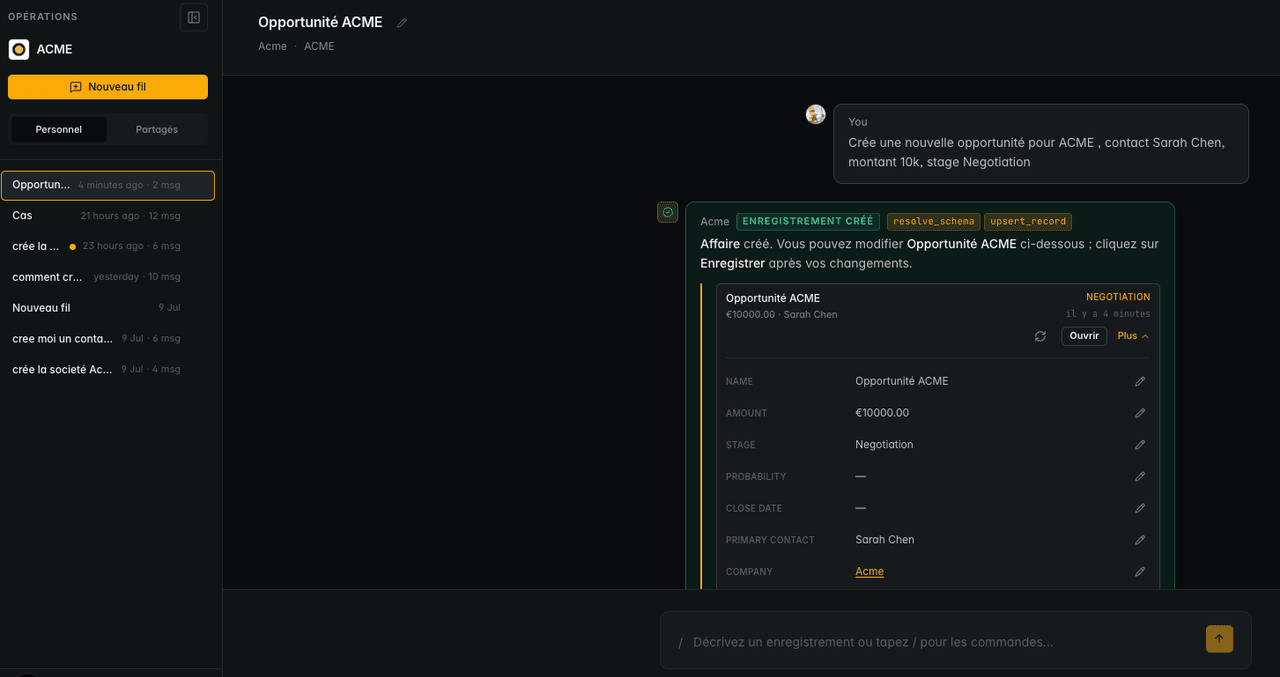

Most small sales teams know they should hold a weekly pipeline review, yet the meeting often turns into a slow tour of a spreadsheet: someone shares a screen, people argue about which version is current, and the real questions (what closes this month, what is stuck, who owns the next step) get answered too late. In a TPE or PME with three to fifteen people selling, that hour matters. This playbook shows how to run a 30-minute weekly pipeline review in Ostrata, the AI-piloted CRM for small businesses, so the meeting ends with a cleaner pipeline instead of a longer to-do list.
Transparency note: Ostrata is built by the founder of ASC Digital. The steps below rely only on features described on ostrata.io.
Why a weekly pipeline review breaks down in small teams
Small teams rarely lack data. They lack one shared view of it. Typical symptoms:
- Stale numbers: deal values and close dates were last touched at the previous meeting.
- Hidden blockers: deals sit in an early stage for weeks without anyone noticing.
- No owner on the next step: everyone agrees a follow-up is needed, nobody writes it down.
- Admin after the meeting: updates are promised "for later" and never reach the CRM.
The fix is less about discipline and more about setup: the questions you ask every Monday should be answered by saved views that refresh on their own, and corrections should happen in the CRM during the meeting, not afterwards.
Step 1: turn your recurring questions into pinned Live Views
In Ostrata, Live Views are tables, kanban boards or charts generated over your live CRM data. You create one by typing /view or a plain-language request in Operations, the chat workspace, then pin it to the Views hub where teammates with access can open it.

Ostrata's own weekly pipeline review use case suggests starting from the questions you ask every week. A practical starter set:
- Deals by stage this quarter, as a bar chart: type something like "/view deals by stage — bar chart for this quarter".
- Closing this month, as a sortable table with owner, value and close date.
- Stuck in an early stage, as a table of deals that have not moved past prospect.
- Missing next step, as a table of open deals with no planned follow-up.
- The board itself, as a kanban of deals by stage for the walk-through.
Name each view clearly in the hub so nobody recreates it. Reuse the same pinned views every week rather than generating new ones; the comparison week to week is what makes the review useful. If you change fields or stages in Setup, regenerate the affected views.
Step 2: build one review dashboard for the meeting
If you prefer a single screen, combine the essentials in a dashboard. Ostrata dashboards sit on a 12-column grid and can mix bar, line and gauge charts, list views and rich-text blocks, with up to 20 tabs and 50 widgets per tab. A rich-text block at the top is a good place for the agenda and the team's monthly target.
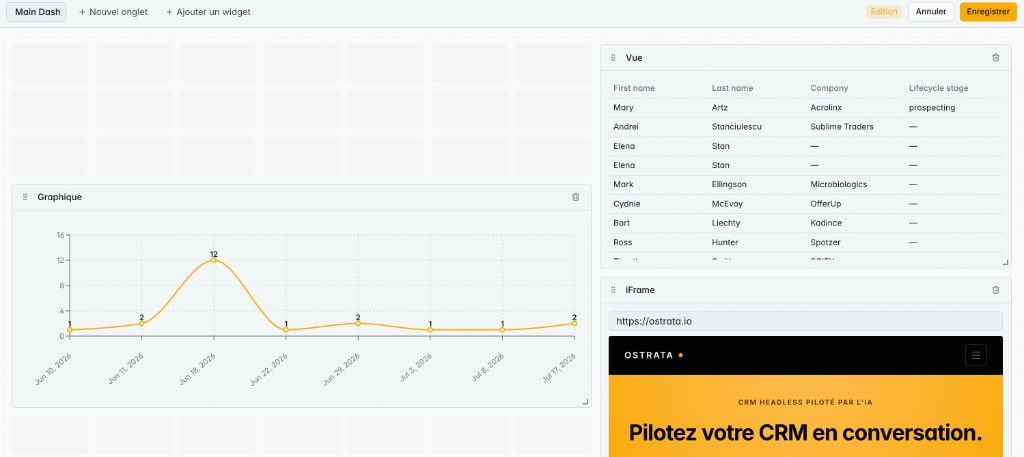
Choose Live Views if your questions change often and you like asking for a new cut on the fly. Choose a dashboard if the meeting follows the same agenda every week and you want everything on one page. Many teams use both: the dashboard for the overview, Live Views for drill-downs.
Step 3: run the 30-minute weekly pipeline review
A simple agenda that fits most small teams:
- Minutes 0–5, the big picture: open the deals-by-stage chart and compare it with last week.
- Minutes 5–15, closing this month: go through each deal in the closing-this-month view. Confirm value, close date and the very next action.
- Minutes 15–22, stuck deals: review the stuck and missing-next-step views. For each deal, decide: push, park or close as lost.
- Minutes 22–28, fix the data live: make corrections in Operations while everyone is still in the room (see below).
- Minutes 28–30, commitments: each owner states their two or three follow-ups for the week.
The key habit is fixing records during the meeting. Ostrata's deal pipeline use case shows the pattern: a single message such as "Move the Acme Corp deal to negotiation and set close date to end of month" updates the deal, and stage changes keep their notes on the record. Refresh the pinned views and the change is already there. Permission profiles control which fields each member can see, so you can share the same views with the whole team.
Step 4: close the loop with follow-ups and tasks
A weekly pipeline review only pays off if the follow-ups happen. Two Ostrata features cover this without extra tools:

- Notes in one message: after a call, the log calls and follow-ups flow lets you search for the contact first, then write what happened and when to follow up ("follow up Friday") in a single Operations message.
- Tasks with reminders: tasks require an assignee, and "Set reminder" notifies that person in-app, so each commitment from the meeting has a name and a date.
If you want an extra signal, Ostrata's AI fields can add a 0–100 score or a short summary with a suggested next action on records, run in batches of up to 500 records from Setup. Treat these as prompts for discussion, not as a forecast. If you also prepare client meetings with an AI assistant, our guide on connecting Claude to your CRM for meeting prep builds on the same data.
What to do now
A checklist to set up your first weekly pipeline review this week:
- Write down the four or five questions your team asks every Monday.
- Create one pinned Live View per question and name them clearly.
- Optionally group them in one review dashboard with an agenda block.
- Agree that all corrections are made in Operations during the meeting.
- End each review with tasks that have an assignee and a reminder.
- After four weeks, drop the views nobody opens and add the ones you missed.
On cost, Ostrata's plans page currently lists a Free plan for one person and a PRO plan at €21 per seat per month (10% less on yearly billing), with a 30-day free trial; prices can change, so check the page before you decide. Records are hosted in the EU. New to CRM altogether? Start with our overview of how Ostrata helps small teams.
Conclusion
A good weekly pipeline review is short, repeatable and ends with clean data. Save your recurring questions as Live Views, fix records while the team is still together, and turn every commitment into an assigned task. If you want help designing the review, the stages or the automations around it, ASC Digital can support you through its AI process automation service or a broader Ostrata setup.